
Fix Weak Mobile Signal at Home UK Guide - SIM Only Offers
Struggling with weak mobile signal at home? Learn easy UK fixes like WiFi calling, boosters, and coverage tips to improve connection.
4/21/20264 min read
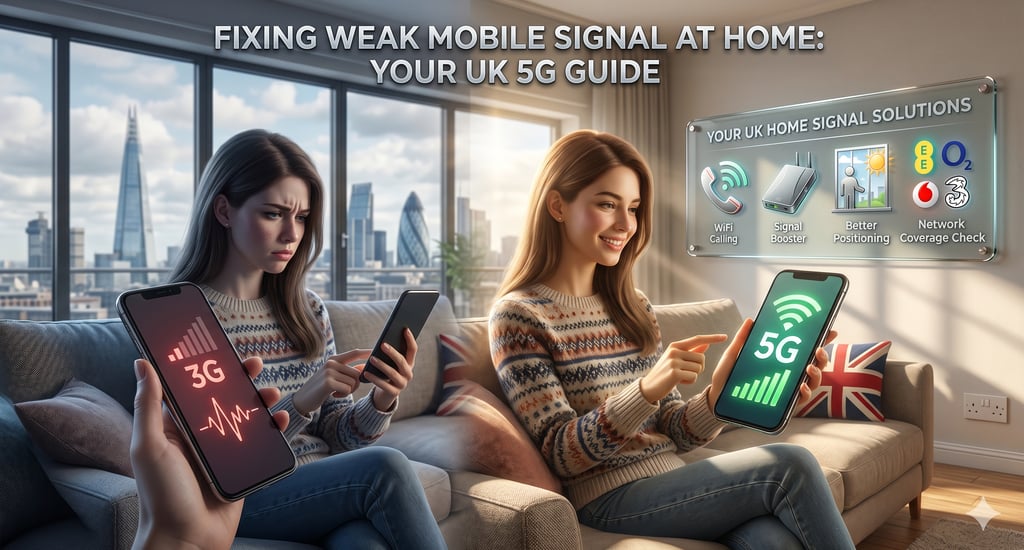
If you constantly struggle with dropped calls, slow data, or missed messages, you’re likely dealing with weak mobile signal at home. This is a common issue across the UK, especially in rural areas, thick-walled buildings, and densely populated cities.
The good news is that there are practical solutions to fix weak mobile signal at home and improve your connection without always changing your phone or network. In this guide, we’ll explain why it happens and how to boost your signal effectively.
Why You Get Weak Mobile Signal at Home
There are several reasons why you might experience weak mobile signal at home. One of the most common causes is poor mobile network coverage UK, which varies depending on your location and provider.
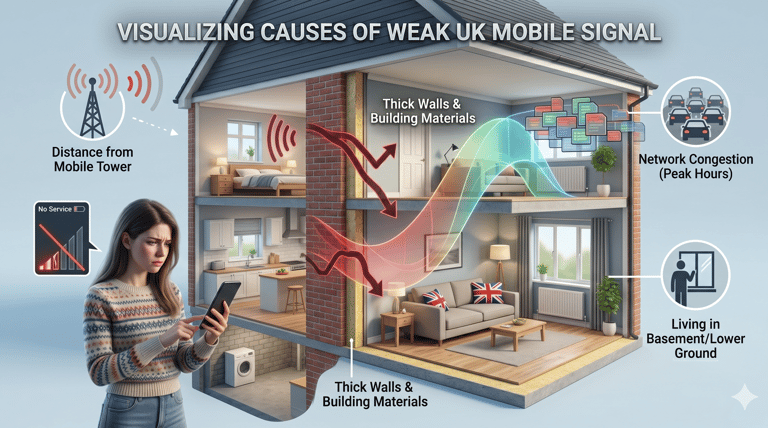
Other factors include:
Thick walls or building materials blocking signal
Distance from the nearest mobile tower
Network congestion during peak hours
Living in basements or low-ground areas
All of these can lead to poor mobile reception and frustrating connectivity issues. Understanding the cause of your weak mobile signal at home is the first step to fixing it.
Check Your Mobile Network Coverage First
Before trying any technical solution, always check your mobile network coverage UK. Different networks perform differently depending on your area.
Major UK networks include:
EE
O2
Vodafone
Three UK
If your provider has weak coverage in your area, you may continue experiencing weak mobile signal at home no matter what fixes you try.
Switching networks or comparing SIM-only plans can sometimes be the simplest solution to improve poor mobile reception.
Use WiFi Calling to Improve Signal
One of the easiest solutions for weak mobile signal at home is enabling wifi calling uk. This feature allows you to make calls and send texts using your internet connection instead of relying on mobile towers.
Most modern smartphones and UK networks support wifi calling uk, and it works especially well in areas with mobile reception problems.
Benefits include:
Clearer calls indoors
No dropped connections
Better performance in areas with weak mobile signal at home
If your network supports it, this is one of the fastest ways to fix poor mobile reception.
Try a Mobile Signal Booster
A popular solution for weak mobile signal at home is using a mobile signal booster uk. These devices amplify weak signals and distribute them throughout your home.
A typical mobile signal booster uk setup includes:
An external antenna
A signal amplifier
An internal antenna
This helps reduce mobile reception problems, especially in large houses or areas with thick walls.
However, not all boosters work equally well, so always check compatibility with your network before buying.
Move Closer to Windows or Higher Areas
Simple changes in positioning can help reduce weak mobile signal at home. Moving closer to windows, upper floors, or open spaces often improves signal strength.
This is especially useful if you experience poor mobile reception in basements or interior rooms.
Even small adjustments can help reduce mobile reception problems without needing any equipment.
Switch to a Better Mobile Plan
Sometimes the issue isn’t your phone it’s your network or plan. Many users with weak mobile signal at home are actually on networks with poor local coverage.
Comparing SIM-only deals can help you find better options with stronger mobile network coverage UK. Many providers offer flexible plans that allow you to switch easily.
This is especially useful if you frequently face mobile reception problems and need a more reliable connection.
Restart and Reset Network Settings
If you suddenly experience weak mobile signal at home, a quick reset can sometimes help:
Restart your phone
Turn airplane mode on and off
Reset network settings
While this won’t fix long-term poor mobile reception, it can temporarily improve connectivity when facing mobile reception problems.
Avoid Network Congestion Times
During peak hours, you may experience weak mobile signal at home due to high network traffic. This is common in cities and busy areas.
Even strong networks can struggle with poor mobile reception when too many users are online at once.
Using wifi calling uk during these times can help maintain stable communication.
When to Consider Changing Your Network
If you consistently face weak mobile signal at home, even after trying all solutions, it may be time to switch providers.
A better network with stronger mobile network coverage UK can make a huge difference. Many users find that changing providers instantly resolves mobile reception problems.
Always compare coverage maps before switching to ensure better indoor performance.
FAQs
Why do I have weak mobile signal at home?
You may experience weak mobile signal at home due to poor mobile network coverage UK, thick walls, distance from towers, or network congestion. These factors can lead to poor mobile reception and unstable connections indoors.
How can I improve weak mobile signal at home without changing my network?
You can improve weak mobile signal at home by moving closer to windows, restarting your phone, or switching on wifi calling uk. These simple steps often help reduce mobile reception problems without needing a new provider.
Does WiFi calling help with weak mobile signal at home?
Yes. wifi calling uk allows you to make calls and send texts using your internet connection instead of mobile towers. It is one of the easiest solutions for weak mobile signal at home and helps fix poor mobile reception indoors.
Do mobile signal boosters really work in the UK?
A mobile signal booster uk can help improve indoor coverage by amplifying weak signals. It is especially useful for large homes or buildings with thick walls where weak mobile signal at home is common. However, performance depends on your provider and setup.
Should I change my network if I always have poor signal?
If you constantly experience weak mobile signal at home, it may be due to poor mobile network coverage UK in your area. Switching providers or comparing SIM-only plans can often solve ongoing mobile reception problems more effectively than technical fixes.
Dealing with weak mobile signal at home can be frustrating, but it’s not permanent. From simple fixes like enabling wifi calling uk to advanced solutions like a mobile signal booster uk, there are multiple ways to improve your connection.
If the issue continues, it may be linked to your network’s mobile network coverage UK, meaning switching providers could be the best long-term solution.
By understanding the cause and applying the right fix, you can significantly reduce poor mobile reception and enjoy a more stable connection at home.

SIM ONLY OFFERS
Get in touch for more information today.
Follow
info@simonlyoffers.co.uk
© 2026. All rights reserved.
Support