
Activate SIM Card Fast in 2026: Easy Guide - Sim only offers
Activate SIM card with this simple UK guide. Learn fast steps, fix issues, and get your SIM working quickly
4/22/20264 min read
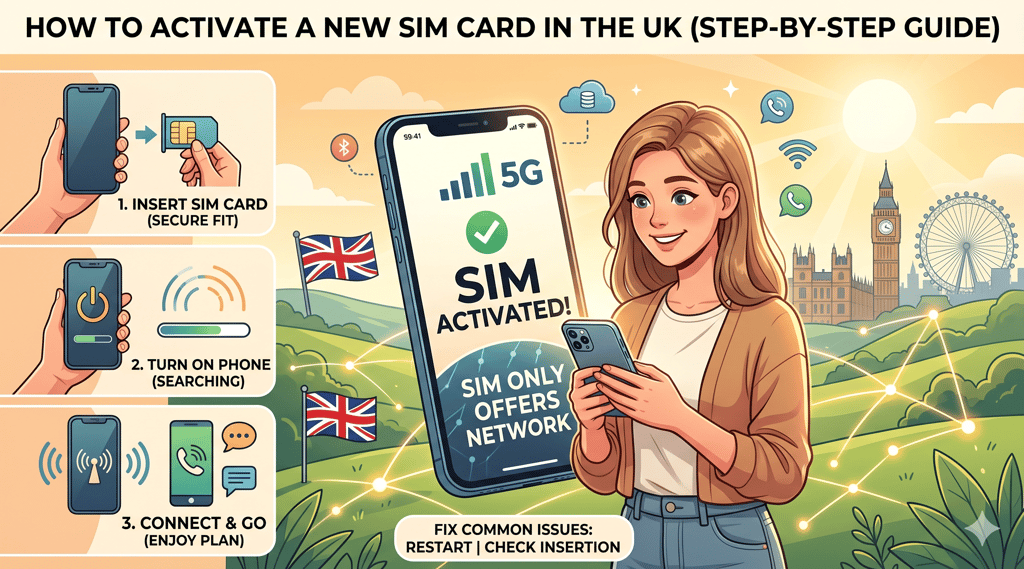
Getting a new SIM card should be exciting, not confusing. But for many people, the moment they insert it and see “No Service” or “Mobile Network Not Available,” frustration kicks in.
The good news? Learning how to activate SIM card in the UK is actually simple if you follow the right steps.
In this guide, we’ll walk you through everything you need to know about activate SIM card, from inserting it correctly to fixing common issues like a sim card not working or no signal problems.
Before You Start: What You Need
Before you activate SIM card, make sure you have everything ready:
Your new SIM card
An unlocked mobile phone
A stable WiFi connection (optional but helpful)
Your account details (if required by the network)
Most UK networks like EE, O2, Vodafone, and Three follow similar activation processes, so the steps below apply broadly.
Step-by-Step Guide to Activate SIM Card
Let’s break down the exact steps to activate SIM card quickly and correctly.
1. Insert Your SIM Card
Turn off your phone, open the SIM tray, and insert the new SIM card properly.
Make sure it fits securely this avoids issues like phone not detecting SIM card.
2. Turn On Your Phone
Switch your phone back on and wait for it to boot.
Your device should begin searching for a network automatically. This is the first step in the sim card activation process.
3. Wait for Network Connection
In many cases, your SIM will activate automatically within a few minutes.
If you see signal bars appear your activate SIM card process is already working.
4. Follow Network Instructions (If Required)
Some providers require manual activation via:
SMS confirmation
Online account login
Activation link
This is common with networks like Vodafone or O2.
5. Restart Your Phone
Once activation is complete, restart your phone to finalize the activate SIM card process.
How Long Does It Take to Activate a SIM Card?
This is one of the most common questions.
Most SIMs activate instantly
Some take up to a few hours
In rare cases, it may take up to 24 hours
If your activate SIM card process takes longer than a day, there may be an issue.
Keeping Your Number (Using a PAC Code)
If you’re switching networks and want to keep your number:
Request a PAC code from your old provider
Give it to your new network
Insert your new SIM
Wait for transfer (usually within 1 working day)
This step is crucial if you're moving to networks like EE or Three.
Common Problems When You Activate SIM Card (And Fixes)
Sometimes things don’t go smoothly. Here are the most common issues and how to fix them.
New SIM Card Not Working
If your new sim card not working, try:
Restarting your phone
Re-inserting the SIM
Checking if activation is complete
SIM Card No Signal Fix
If you see no bars:
Toggle airplane mode
Move to an area with better coverage
Check network outages
This is a common sim card no signal fix situation.
Mobile Network Not Available
If your phone shows mobile network not available:
Ensure your phone is unlocked
Try manual network selection
Contact your provider
SIM Card Not Working Properly
If your sim card not working, it could be:
Damaged SIM
Incorrect insertion
Network delay
Phone Not Detecting SIM Card
If your device doesn’t recognise the SIM:
Clean the SIM gently
Try it in another phone
Check SIM tray alignment
This is a classic phone not detecting SIM card issues.
No Service After eSIM Activation
For eSIM users, sometimes you may experience no service after esim activation.
Fixes include:
Restarting your device
Re-downloading the eSIM profile
Checking network compatibility
Tips to Get the Best Signal After Activation
Once you activate SIM card, you want the best performance.
Try these tips:
Keep your phone updated
Enable 4G/5G settings
Avoid low-signal areas like basements
Remove bulky phone cases
iPhone vs Android SIM Activation
The activate SIM card process is similar, but there are slight differences.
On iPhone:
Usually activates automatically
May require Apple ID login
On Android:
May need manual APN settings
More network configuration options
How to Use a New SIM Card Properly
Once your SIM is active, knowing how to use a new SIM card matters:
Make a test call
Send a text message
Turn on mobile data
Check your balance or plan
This confirms your activate SIM card process worked successfully.
Why SIM Card Activation Sometimes Fails
Even if you follow all steps, activation can fail due to:
Network delays
Incorrect account setup
SIM not registered properly
This is why understanding how to activate sim card correctly is important.
Choosing the Right SIM After Activation
Once you activate SIM card, it’s worth asking:
Are you getting the best deal?
Many users activate a SIM and later realize they’re overpaying.
Switching to a SIM-only plan can give you:
Lower monthly costs
Flexibility (no long contracts)
Better network options
Providers like EE, O2, Vodafone, and Three offer competitive deals worth comparing.
FAQs
Do I need to activate my SIM card?
Yes, most SIMs require activation before use.
Why is my SIM card not working after activation?
It could be a delay or a setup issue. Try restarting your phone.
Can I use my SIM immediately after inserting it?
Sometimes yes, but often you need to complete the activated SIM card process first.
What should I do if my SIM card is not working?
Check placement, restart your phone, and ensure activation is complete.
How do I know my SIM is activated?
You’ll see signal bars and be able to make calls or use data.
Learning how to activate SIM card in the UK doesn’t have to be complicated.
In most cases, it takes just a few minutes:
Insert your SIM
Turn on your phone
Wait for activation
If something goes wrong don’t panic. Issues like sim card not working, signal problems, or network errors are usually easy to fix.
And remember activating your SIM is just the first step.
Choosing the right plan can save you money and improve your experience long-term.
sim card no signal fix
SIM ONLY OFFERS
Get in touch for more information today.
Follow
info@simonlyoffers.co.uk
© 2026. All rights reserved.
Support